Canmephian Realm
Throng Realm
Reader Technical questions
We've found that some eBook readers have issues with the books.
I'm missing some characters around text in TTLS
This novel uses several unusual Unicode characters that aren't found in many fonts. If you have an eReader mentioned below, follow those instructions first.
That said, you may need to install all of these font families on your device as a fall back font.
- Noto Sans
- Noto Serif
- Noto Sans Symbol
- Noto Sans Symbol 2
- Noto Sans Math
What have you tested against?
We've tested against:
- Kindle Paperwhite
- Kobo Clara Color
- XTEink X4
What are these acronyms? GSTS? NR? TTLS?
- GSTS: Going Station to Station
- NR: Nomadic Railways
- NR/RtR: Roaming the Rails
- NR/KOT: Keeping On Track
- NR/ST: Synthetic Terminal
- TTLS: Tripping the Light Synthetic
- 4KS: 4K Scenery
Device Specific Issues:
I have an XTEink X3 or X4 reader...
Updated Aug 7th, 2026
The best reading experience is for you to switch to a better firmware. We tested against:
- CrossInk v.1.4 or greater
- CrossPoint Reader v1.5 or greater
Later revisions improve the reading experience. Still, both need some fonts loaded onto them. These are in CrossPoint format! They're generated from fonts you can find off of Google Fonts. Download them below:
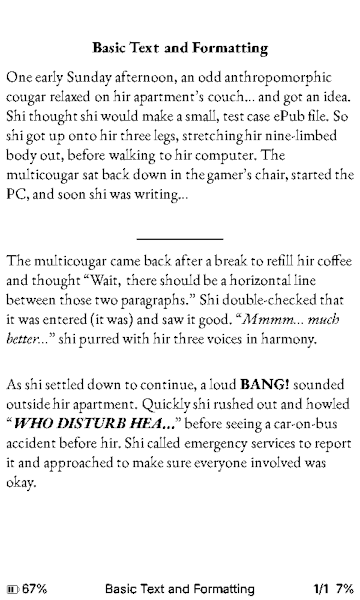 | 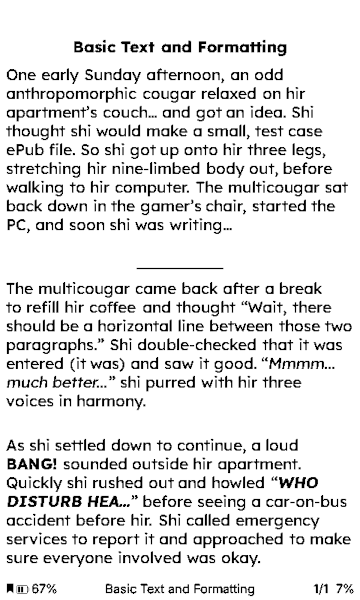 | 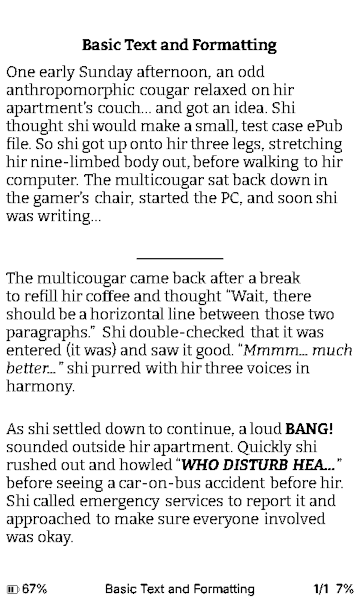 |
| EB Garamond (used in the print versions) | Lexend (better readability) | Bitter (slab serif reader font) |
| Attach:EB_Garamond-Fallback.zip | Attach:Lexend-Fallback.zip | Attach:Bitter-Fallback.zip |
To install them:
- Extract the contents of the download file to a temporary directory.
- On your X4/X3...
- Go back to the home screen if you're reading a book already.
- Select "File Transfer"
- Select "Join a Network" and set it up. You need to get to the serving screen (with the QR code).
- Open the link under the QR code
- Select "Fonts"
- At the bottom of the page, select the font directory that you extracted earlier.
- If the browser asked if you want to do this, select yes or upload.
- Click "Upload" on the page
- Wait for all the "cpfont" files to upload.
- (optional) Repeat for uploading the remaining fonts.
- Back on the X4/X3...
- Exit File Transfer
- Navigate to Settings, then Reader, then Font Family
- Select the font you want.
- Exit back out to the front page
- Enjoy reading your books!
I don't like the fonts you have above for the XTEink readers.
Got the TTF font files? Then use CrossGlyph to convert them to cpfont files. Note you must first have it pull the fallback font pack (see the site's instructions).
To match the above fonts, use the following interval:
reading,(0x0250-0x026F),(0x2100-0x214f),(0x2300-0x23ff)
There seems to be some extra spacing between paragraphs, and it's increasing...
Download a fresh copy of the ePub. It's the book and the reader's interaction with some bad formatting. I fixed the formatting but the revisions may not have come out.
CrossInk is working on a "fix" for such quirky ePubs.
Story questions
Writer/Process questions
What are you using to write these books?
Let me describe my process:
- Most of the writing is done with text editor. Notepad++, Xed on Linux, or even Textastic on iPhone and iPad. Yes, I've used Bluetooth keyboards on the latter. I write with some formatting called Markdown.
- This gets converted using a Perl script and Pandoc into Word DOCX format.
- It then is loaded into LibreOffice for merging into a "master" document, spell checking, the first round of proof reading, and initial layout. (I'm working on getting some of the layout auto-generated)
- Once done, the "master" is run through Jutoh to create two ePubs, one regular, one Kindle-specific. (I could use LibreOffice but there's a lot to be desired with the ePub export)
- The ePubs are loaded onto a jailbroken Kindle and the remaining devices (mostly using Calibre).
- Proofreading begins, using different fonts like Lexend to identify grammar issues and areas of "jank". The master is edited and the previous two steps are repeated until satisfied.
- Various editors are brought in to identify more issues.
From there, once the text is locked in, we're onto "post-production" where the cover artist is commissioned and things are ready for release.
What Jutoh settings do you use?
All books get Format >> Book >> Formatting Cleanup run with the following settings:
- Remove unusued bookmarks
- Remove all comments
- Remove redundant character formatting
- Remove empty paragraphs
In addition, the book configuration is used:
- Embed fonts
- Generate Font Names
- Generate Color
- Use specified image file names